FitTrack AI
A food, training and body-weight diary you chat with in Portuguese, getting back numbers computed from an official food-composition table — all on your own computer, with the AI limited to understanding the text.
- input
- chat in Portuguese · offline rules + optional Ollama
- data
- TACO 4th ed. (NEPA/UNICAMP) · extracted from the official PDF
- calculation
- Mifflin-St Jeor · Compendium METs · deterministic Python
- storage
- local SQLite · migrations · audit log · backup · CSV
- interface
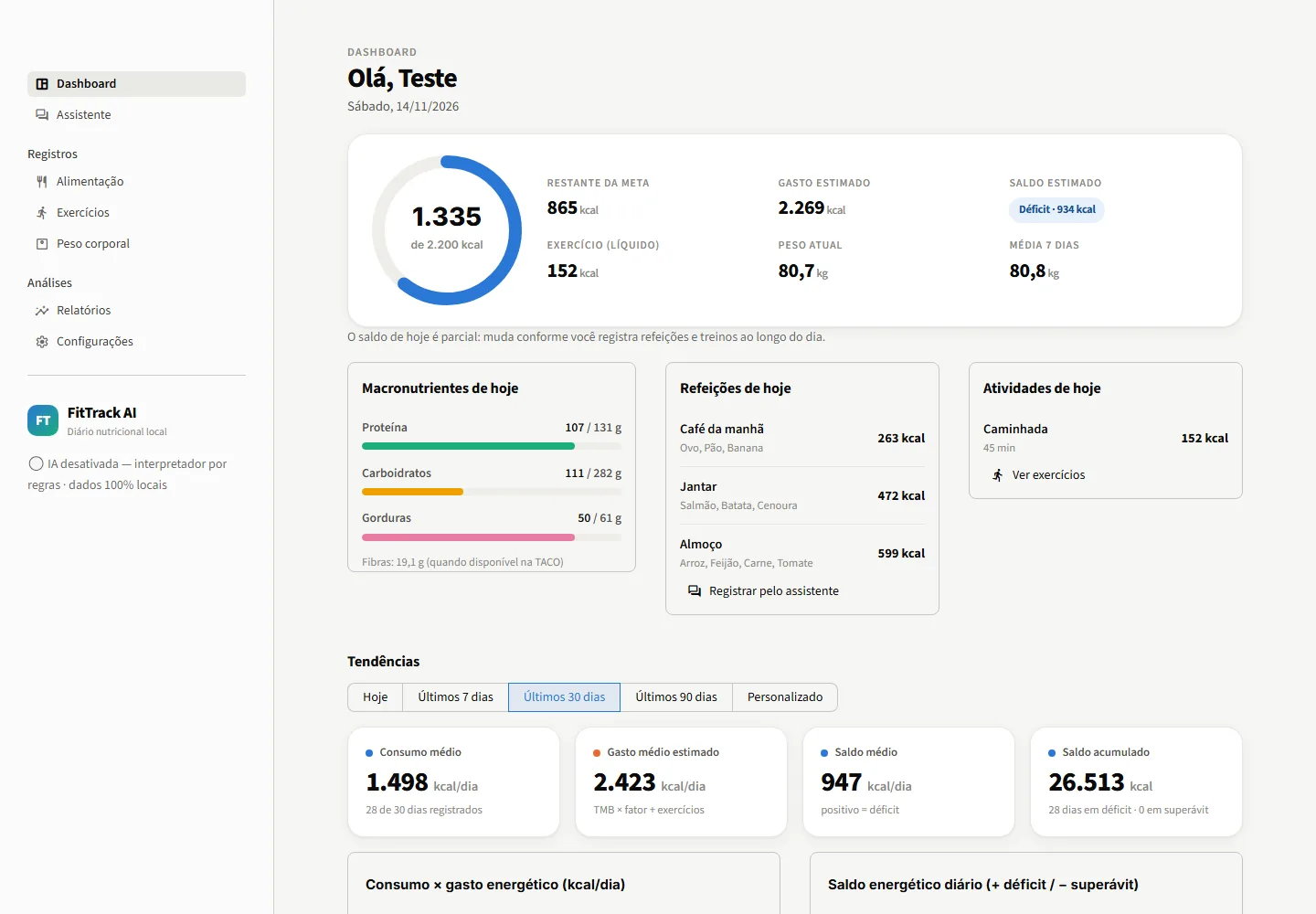
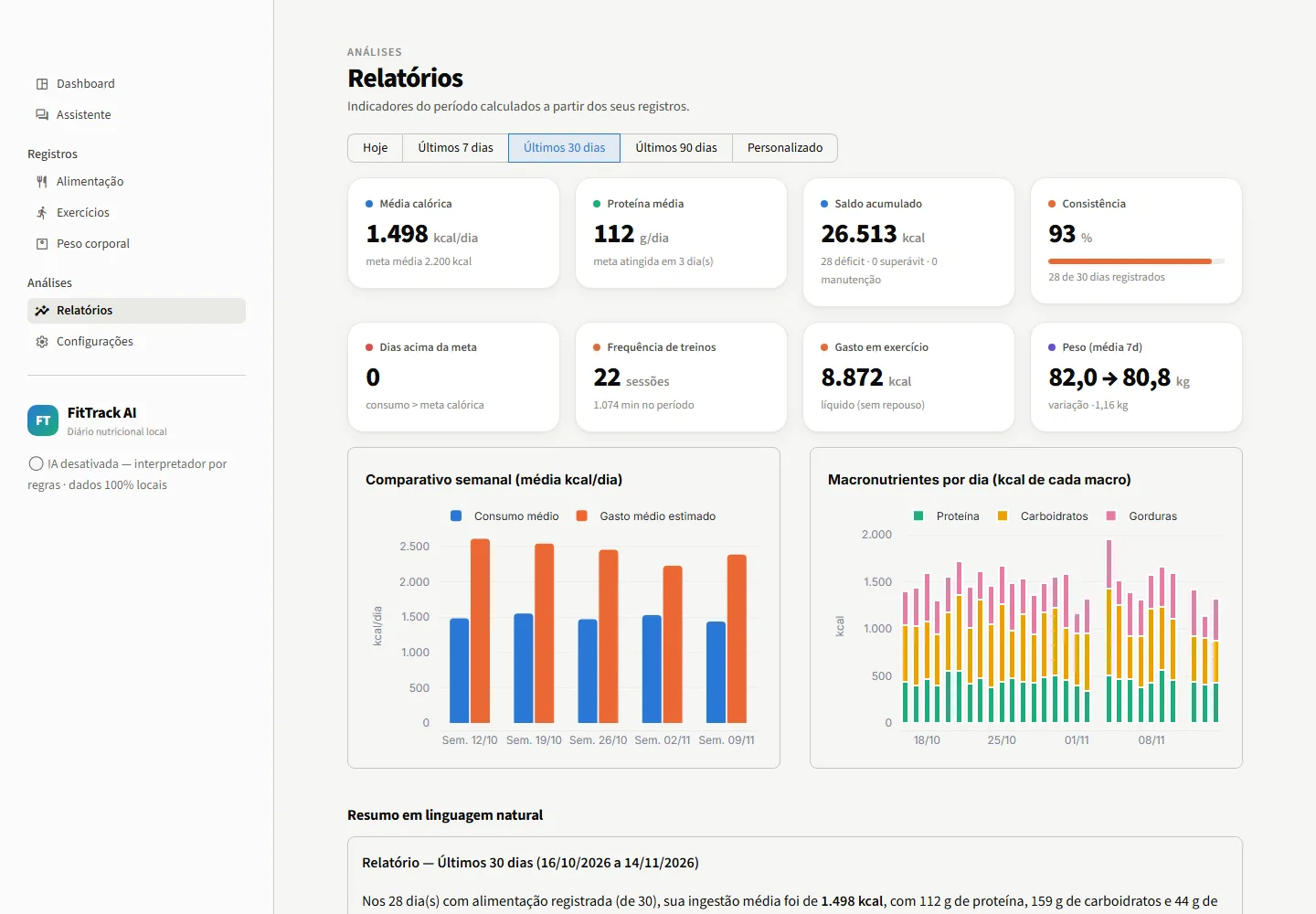
- Streamlit · 7 pages · 8 charts with period filters
- status
- runs locally (Windows: iniciar.bat) · no online version
- repository
- github.com/Igor-Millis/fittrack-ai ↗
LLMs understand text — and invent numbers
Asking a chatbot “how many calories are in my lunch?” works surprisingly well — until it doesn't. The model may put 180 g of chicken at 250 kcal one day and 330 the next, “remember” a value that is in no table, or say it logged something it did not. For a diary that adds up months of data, that is unacceptable.
The project's rule: the AI only turns text into structure; every number comes from deterministic code and sourced data. And nothing is saved without your confirmation.
From text to database, with a draft in between
message ─► parsing (PT-BR rules  or  optional Ollama)
        ─► validated JSON (Pydantic)  ─► "grounding" in the original text
        ─► TACO lookup + unit conversion + METs  (Python)
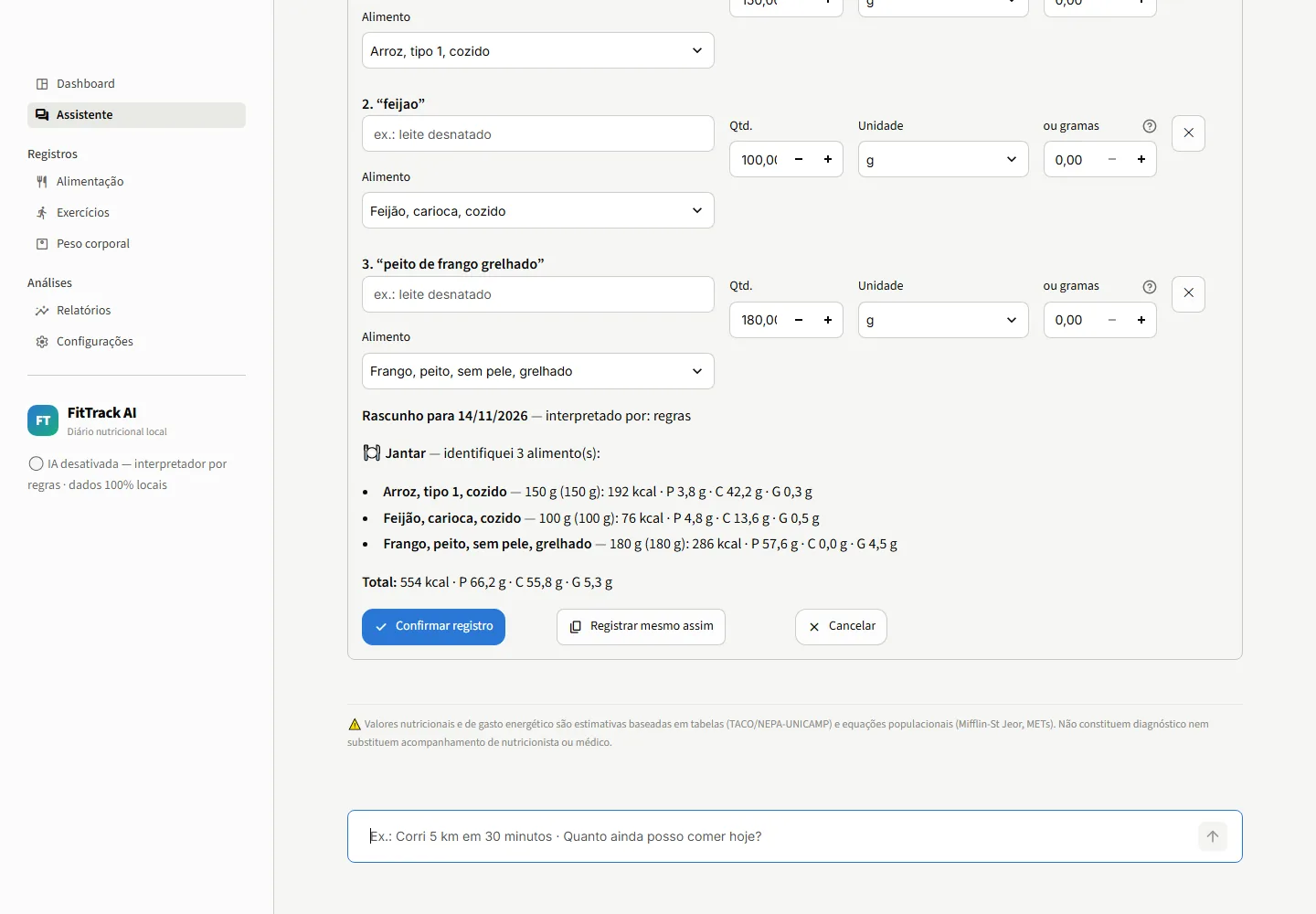
        ─► editable DRAFT  ─► explicit confirmation  ─► SQLite
question ─► analytics engine (pandas over the database) ─► templated answer
Questions such as “how much can I still eat today?”, “compare this week with last week” or “which days was I over my target?” map to analytics queries and are answered from templates. The LLM never writes numbers — so the number in the sentence is, by construction, the number in the database.
Two parsers, one contract
A rule-based parser for Portuguese (spelled-out numbers, “half a bread roll”, “1h20”, “pace 5:30/km”, dates such as “yesterday” and “12/11”) works offline with no model at all. When Ollama is on, it gets the same message and must return JSON in the same schema, with structured output at temperature 0.
Then comes grounding: every quantity, duration or weight the LLM returned must appear in the message (directly or through an obvious conversion such as 1 h → 60 min). If not, it is dropped; foods not in the text are removed; whatever is missing is filled in by the rules or asked.
| Message | LLM returned | After grounding |
|---|---|---|
| “comi arroz e 2 ovos e corri 5 km” (rice, 2 eggs, ran 5 km) | rice 150 g · eggs 2 · banana 1 · run 30 min, 5 km | rice (how much?) · eggs 2 · run (how long?), 5 km |
TACO extracted from the official PDF, units without guessing
The source is TACO, 4th edition (the Brazilian food-composition table, NEPA/UNICAMP, 2011), whose publication allows reproduction with attribution. The extractor reads the PDF's words with their positions and assigns each number to the nearest column — needed because empty cells do not appear in the text. Result: 597 rows checked for Atwater consistency (4/4/9 kcal/g); 6 items TACO itself marks as not analysed (including whole cow's milk) are not imported — the app asks for the label instead of making them up.
| Unit | Rule |
|---|---|
| g, kg, mg | direct |
| ml, l | only with a known density for that food |
| unit, slice, ladle, pot… | only with a household measure registered for that food (shown in the draft) |
| anything else | the assistant asks for grams |
When a name is ambiguous (“leite” matches coconut, goat's or condensed milk…), the app shows the options instead of picking for you.
Without counting the workout twice
Basal metabolic rate comes from Mifflin-St Jeor. The classic mistake is adding a workout's gross energy to a daily expenditure that already includes rest: one hour at 5 METs for 80 kg “burns” 400 gross kcal, but 80 of them you would burn sitting still.
daily expenditure = BMR × sedentary factor  +  Σ (MET − 1) × weight × hours
                      baseline                   only the workout's NET energy
There is an alternative method (BMR × activity-level factor, without adding workouts). For running, walking and cycling with distance and time, the MET is interpolated by speed.
A day without logs is not a deficit day
If you forgot to log Tuesday's food, a naive calculation sees 0 intake and a 2,000 kcal “deficit” that contaminates averages and the running balance. Here, days without food logs have no balance and stay out of the averages.
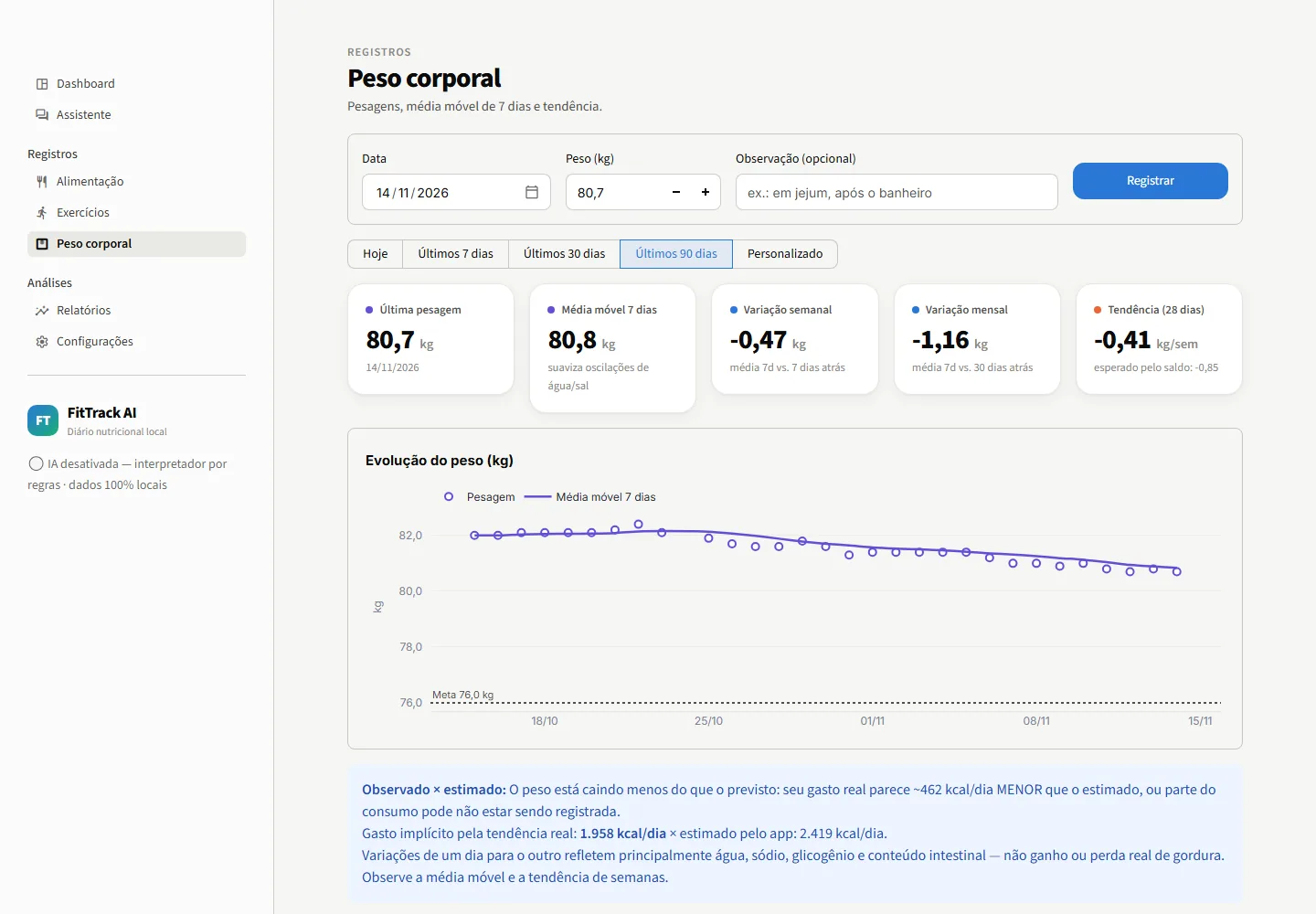
For weight, the app shows a 7-day moving average and a regression trend, and compares the observed change with the one expected from the balance. With enough data (≥ 8 weigh-ins over ≥ 14 days and ≥ 10 logged days), it estimates the expenditure implied by the real trend and warns when the app's estimate looks too high or too low.
Seven pages, all local
A dashboard with 8 charts and period filters, a chat assistant, and pages for food (with manual entry and CSV import), exercise, weight, reports and settings. The interface is in Portuguese; the screenshots below use 30 days of simulated data, generated through the chat itself.
Data, tests and limits
- Your data stays yours: local SQLite with versioned migrations, foreign keys and range constraints; a nutrient snapshot in every item; duplicate protection; change history; automatic backup, restore and CSV export; logs without message contents.
- 137 tests: units, calculations, no double counting, moving averages, persistence, duplicates, ambiguity, history questions checked against known values, grounding of LLM output, rendering of every page and two tests against a real Ollama. They found real bugs — “almocei arroz” (I had rice for lunch) turning into “rroz”, “bike ergométrica” classified as outdoor cycling, a future date silently moved to the previous year.
- Limits: everything is an estimate (TACO, METs, the BMR equation); TACO has no whey or liquid whole milk; the default household measures are approximate; there is no photo logging or label reading yet.
git clone https://github.com/Igor-Millis/fittrack-ai
cd fittrack-ai
iniciar.bat                       # Windows; or: pip install -r requirements.txt && streamlit run app/main.py
ollama pull qwen2.5:3b            # optional: local AI